

|
|||||||


 |
|
|
Thread Tools

|
Search this Thread
|
Display Modes
|
|
#1
 Mar 24 2010, 08:21 AM
|
||||
|
||||
 Chapter 01 - Let's start AND How to Register for the new website!
Farm Town was deactivated by Facebook on 24th July 2023. You should have already registered to be able to play on the Slashkey Website where you can continue playing. If you need help with registration or knowing the differences playing Farm Town on the Website, please click on this link: https://r1.slashkey.com/forum/showthread.php?t=662298
Should you need to get back to this post to look for other information: Each post has a Table of Contents link bottom right of the post, which when you click, will bring you right back here. Last edited by Tiger; Sep 13 2023 at 08:47 AM. |


|
#2
Mar 24 2010, 08:21 AM
|
||||
|
||||
 The basics after creating your account.
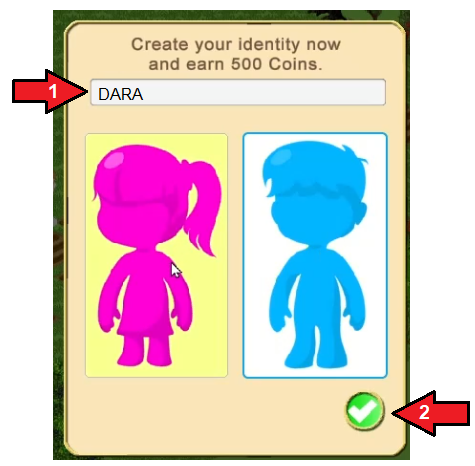
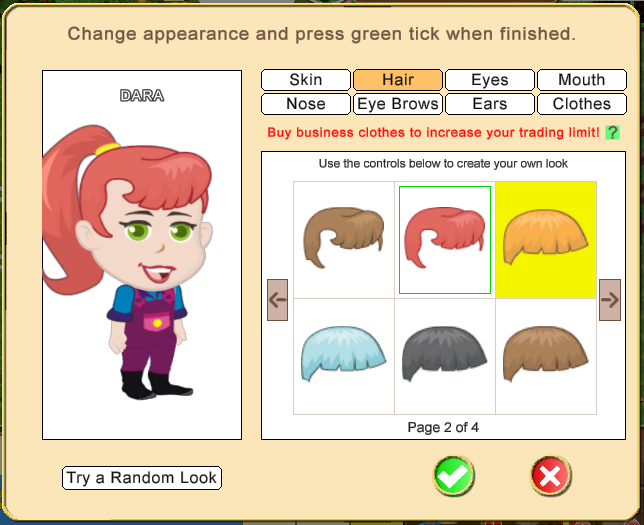
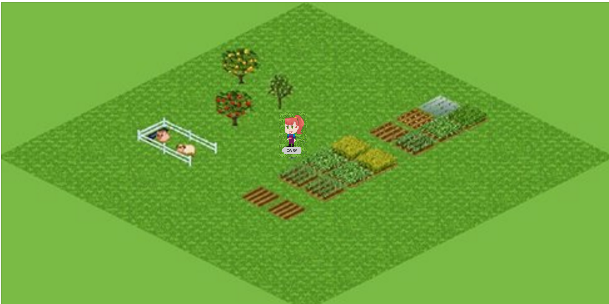
The basics after creating your account. After creating your account and the game loads you will be asked to create your Avatar Identity. You need to type in your Avatars name. Then click on either the female avatar or male avatar. Then click the green check mark to save your choces. In this example the Avatars name is DARA. The next screen you will see is the avatar editor, where you can choose what your avatar appearance will look like. Click on each selection for Skin, Hair, Eyes, Mouth, Nose, Ears, Eyebrows, Clothes, then chose the options you want by clicking on it. The avatar picture to the left will show you what you have picked. The mayor will then take you through the basic steps of farming and what the tools and some icons are for. If you wish to repeat them just click on the Help icon top right of your screen, it looks like a question mark. You will have a few basic things on your farm to start you off: At the bottom of the screen is the Game bar which has 2 main sections. 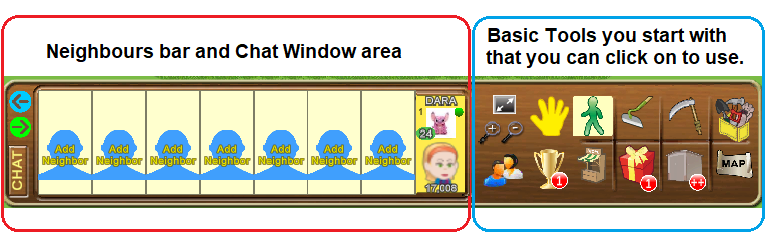 Your profile picture if you have one, will show in the neighbours bar and you will also see the head of your avatar displayed under the profile picture in the neighbours bar as well as those of any neighbours you will have. If you have a Facebook account you can use your current Facebook profile picture to use on the Website. If you wish to do this, please click on this link for instructions: The Add Neighbor and Chat section is where you will any of the farming friends you add as your neighbours. When you get more than 7 neighbours you can use the arrows to the left to scroll the bar to see more of them. In some cases with browsers and various types of computer mouse you can also click and hold down your left mouse button on those spaces to drag them, or use the mouse wheel to move them left/right. NOTE: Currently you can not add Neighbours by clicking on the blue silhouettes as that has not been implemented yet. There are other ways that you can add Neighbour and also Buddies explained in Chapter 05 Neighbours and Buddies Farmer Lists. The CHAT button on the left side of the Neighbours bar allows you to open and close the Chat box. When someone arrives at your farm it will automatically open in place of where your neighbours are showing. When the Chat box is open, just start typing and then click on SEND to send your message or if you are using a keyboard, you can click the Enter/Return key on it instead of clicking on Send. Anyone online where you are can see what you have sent. The right side of the Neighbours bar also rereferred to as the Game bar, is where you have some basic tools. Hover over some of the icons there and it will tell you what it the tool or icon is.
 Full Screen when clicked on will fill your monitor screen with the game screen, making it much bigger to see, which some find easier. Full Screen when clicked on will fill your monitor screen with the game screen, making it much bigger to see, which some find easier. You will find that as you progress through the game and get more involved in other features that you may want to come back out of Full Screen to use them. To go back to normal screen just click on the Full Screen icon again. The plus and minus just below that allow you to zoom the farm in or out (if you have a mouse wheel, you can use that to zoom instead of clicking on the icons).  This is the Help icon, it is at the top right corner of your game screen. Click it if you need another look at the basic guide to some of the items. This is the Help icon, it is at the top right corner of your game screen. Click it if you need another look at the basic guide to some of the items.Congratulations. Now you know the basics, you can play! Last edited by Tiger; Sep 13 2023 at 08:48 AM. |
 Hover over the sound icon and another icon will drop down, the music icon. To turn all sounds off, click on both icons to turn them red.
|
#3
Mar 24 2010, 08:22 AM
|
||||
|
||||
|
How to change my appearance?
You can change your appearance at any time by clicking on your avatar and selecting "Change Appearance" which will appear in a pop-up.
This will launch the edit avatar screen where you can change your appearance. When you change your avatar appearance, other players in the room will notice your change immediately, without requiring a game reload. Last edited by Tiger; Jun 22 2025 at 04:06 PM. |
|
#4
Mar 24 2010, 08:23 AM
|
||||
|
||||
|
How to change the name and sex of my avatar?
In the Account tab at the top of you game screen is a new section called Profile.
Click on the link below for full instructions on how to change the name and sex of your Avatar and much much more! https://r1.slashkey.com/forum/showth...74#post6542674 Last edited by Tiger; Sep 13 2023 at 08:48 AM. |
|
| Tags |
| authorise, avatar, avatar name, change appearance, change name, re-authorise |

 Linear Mode

|
|

All times are GMT -5. The time now is 09:41 PM.