When posting in this thread the moderation team may need to visit your farm to look at an issue for you. Please include your user ID in your post.
How to find your USER ID number and Build Number:
Scroll down the page past your game screen and down again past the yellow box under your farm screen.
Look for the long number just after "Your USER ID number is: ....... "
Example:
This users ID is 00000000 , YOUR USER ID number will be different and could be much longer.
The Build number may be needed if there has been an update or a new release as that number can change.
Instructions should you want to put your farm link into your forum signature can be found by clicking on this link:
https://r1.slashkey.com/forum/showthread.php?t=662838
Farmtown hardware and software minimum requirements:
Players will experience optimal gameplay if your device meets these specs:
- Always check you have Updated your version of Chrome, Firefox, Edge or Opera browsers
- 64 bits Operating System
- 8GB of RAM or higher
- Dual Core CPU
- Dedicated NVIDIA / AMD Video Cards or Integrated Intel Video Cards with 512MB Video RAM with updated drivers, old video card drivers can make the game crash. Check this video for instructions on how to update your video card drivers in Windows: https://www.youtube.com/watch?v=mFvhZ6Lie_s
- WegGL 2.0 Support with Hardware Acceleration enabled. Software only acceleration or Google SwiftShader can slowdown the game. Check this video for instructions on how to enable Hardware Acceleration in the Chrome browser: https://www.youtube.com/watch?v=4F6ix4FhgKA
The game will probably run on older lower-end devices but this will increase the chances of crashes and the game not loading due to Out of Memory or WebGL errors.
Important - always also check that you have done ALL computer updates as well as checking for browser updates at least once a week! These updates are happening much more often than they used to many years ago!
If you experience any kind of memory errors, which in the latest version of Chrome you can identify by a gray screen with a sad face on it:
- Close all the tabs in your browser and then close your browser.
- Close other applications.
- Then load the game in a single browser tab to ensure that your computer's memory is being used towards the game only and not other tasks.
Having a 64 bit Operating System with at least 8GB RAM will considerably decrease the chances of memory errors.
If the game is stuck on a black screen due to WebGL not Supported or Disabled error:
- Ensure you are using the latest version of Chrome, Firefox, Edge or Opera browsers.
- Check if WebGL 1.0 is enabled in your browser using the link below.
If you see a rotating cube, WebGL 1.0 is enabled:
https://get.webgl.org/
If you are limited to only using WebGL 1.0 please also read the update in red further down this post!
- Check if WebGL 2.0 is enabled in your browser using the link below.
If you see a rotating cube with the number 2, WebGL 2.0 is enabled.
WebGL 2.0 is not a requirement to play Farmtown but it will perform better:
https://get.webgl.org/webgl2/
If WebGL is disabled in your browser:
a) Ensure you have Hardware Acceleration enabled in your browser.
b) Update your Video Card drivers.
If you need help with either a) or b) you can follow the step by step instructions on the following website, or you can also check the youtube videos provided at the top of this post:
https://appuals.com/fix-webgl-is-not-supported/
UPDATE AUGUST 2022: WebGL 1.0 may no longer be supported by various browsers as time goes on. There is no date listed by the various browsers as to when it may no longer be supported.
Currently Chrome is no longer suitable for those that have to use WebGL 1.0
If Chrome is showing updated and the setting for Hardware Acceleration is enabled but when you try to load the game WebGL is still showing disabled.
Or if you have previously seen in in the FT Console while using Chrome...
LOGWarning: Your browser does not support "WebGL 2" Graphics API, switching to "WebGL 1"
are no longer seeing that and have already done the steps listed above then you will need try using other browsers instead.
The only way to know which Browser will work best on your device is to try them.
We can only recommend some browsers to try BUT what works well for one person may not for someone else. This is nothing new which is why you have to try them yourself!
If there is no WebGL disabled message but the game does not finish loading:
- Clear your browser cache - remember the first load of Farm Town after clearing browser caches will be slower especially if you have a lot of items set to show in your game preferences like, crops, trees, facilites etc as you will be loading a fresh set of graphics.
- Disable all installed browser extensions - some browser extensions, especially those that hide ads or try to convert Facebook to an old layout may be incompatible with Farmtown. If you find you can load the game after disabling all of them, you can try enabling one, then reload the game to narrow down which extension might be causing a problem before you try enabling another one.
- Uninstall and reinstall your browser - If you only have one browser installed on your computer do NOT uninstall it until you have got another one you know that you can use! Then, IF it's only 1 of the browsers that you are able to use that is having problems loading the game AND you can load it in other browsers, ONLY uninstall and reinstall the browser with the issue. Read any information the browser shows to you when you uninstall it so you know if it will log you out of sites, remove any saved passwords or clear any saved bookmarks that you might want! Only one browser having an issue may be that an update for that browser didn't get correctly updated.
- Try with another updated browser and see if you get the same problems!
If your farms are too slow to load because they are very large and or have a lot on them OR if there is a slow internet connection:
Try enabling the
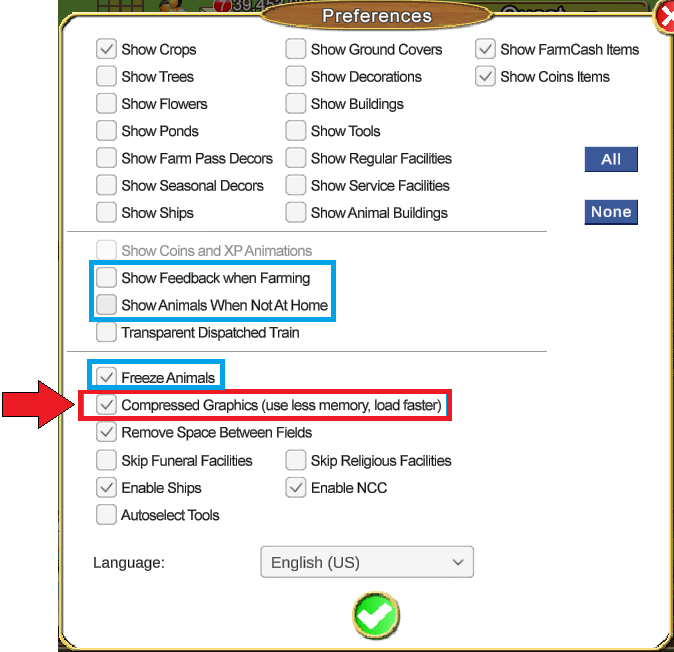
Compressed Graphics option in the Preferences screen.
The graphics will have a bit less quality but will load faster.
How to enable Compressed Graphics:
 Click on the preferences icon top right of your game screen.
- Add the check mark for Compressed Graphics, indicated with the red arrow and red box in the picture below.
You may also want to change a few more settings in that window so that there is less of a demand on your computer. If you do, please also change the following preferences:
REMOVE the check mark for Show Feedback when Farming
REMOVE the check from Show Animals when not at Home.
ADD the check mark for Freeze Animals.
All three settings are indicated in the picture below with a blue box.
- When you enable the Compressed Graphics Setting, you will see a popup with information.
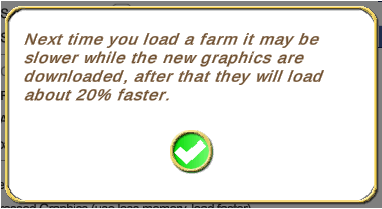
- Click on the green check mark on that popup.
- Then click on the green check mark at the bottom of the preferences window to save your changes.
- Final step.....Reload Farm Town.
If changing the above settings help you, you may also need to consider what you may be adding to your farms when you next change what is on them or upgrade them.
More items, regardless of what they are, especially on the bigger farms are a much bigger demand on your computers resources!
.




 Jan 07 2011, 08:57 PM
 Game Not loading/WebGL disabled/frequent crashes


 Threaded Mode